Logo
Submit a request
Sign in
  1. Fleeq
  2. Fleeqs
  3. Editing

Articles in this section

  • My language is not supported
  • Control your effects when building a fleeq
  • Replacing a narrator
  • How to make a zoom effect
  • RTL (Right to left)
  • Image upload (Size/Format)
  • Fleeq duration
  • How do I publish my content in other languages?

RTL (Right to left)

Avatar
Elya
  • April 23, 2018 10:46
  • Updated
Follow

Fleeq support right-to-left languages in page layout and captions text direction.

To enable, go to the "Captions and layout" section in your fleeq settings
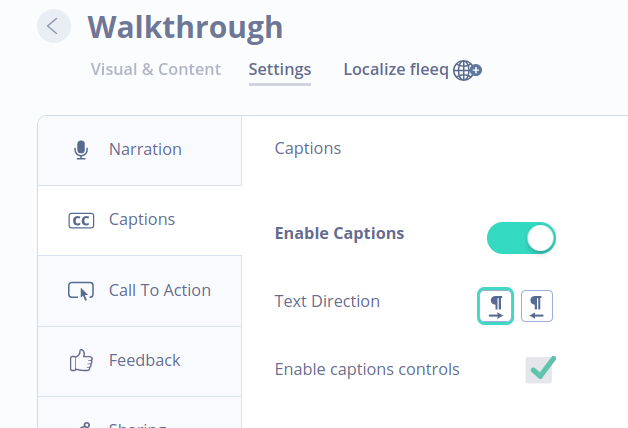
Screenshot_2018-04-23_at_1.44.46_PM.png 

For captions text direction

Screen_Shot_2017-12-17_at_18.09.25.png


  • Facebook
  • Twitter
  • LinkedIn
Was this article helpful?
0 out of 0 found this helpful
Have more questions? Submit a request
Return to top

Related articles

  • How to make a zoom effect

Comments

0 comments

Please sign in to leave a comment.

Fleeq